Home Assistant 2 Excel
Getting Started
Usage is super simple.
Install homeassistant2xlsx
pip3 install homeassistant2xlsx
Create a Excel Workbook with any number of sheets. Add any Home Assistant entity name as comment of the first row,
sensor.gasfor example. Home Assistant stores entities as string by default. Optionally, append|intor|floatfor a corresponding conversion.sensor.gas|intorsensor.gas|floatfor example.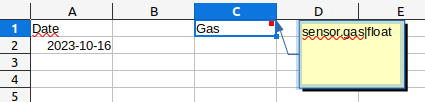
The comments (aka entity names)
date,timeordatetimeprovide the corresponding timestamps.Go to your Home Assistant instance and create a Long-Live API Token.
Run
homeassistant2xlsxhomeassistant2xlsx --host localhost --token YOUR_API_TOKEN my.xlsx
Command Line Interface
usage: homeassistant2xls [-h] [--token TOKEN] [--host HOST] [--port PORT]
                         [--timeoffset TIMEOFFSET] [--version]
                         xlsx

Copy Data From Home-Assistant to XLSX files

positional arguments:
  xlsx

optional arguments:
  -h, --help            show this help message and exit
  --token TOKEN         Home Assistant API Token. Mandatory.
  --host HOST           Home Assistant Port. 'localhost' by default.
  --port PORT           Home Assistant Port. '8123' by default.
  --timeoffset TIMEOFFSET
                        Timestamp offset in minutes. Positive and negative
                        numbers are allowed.
  --version             show program's version number and exit
Programming Interface
Add Home Assistant Data to Excel.